Account
Your data has been deleted and this browser is signed out.
Sign up with Discord, then link your game ID from inside the game. Or simply open this site from the game.
Site accounts sign in with Discord; we only read your Discord name. After signing in, link your game ID from inside the game to upload capes. From then on you can sign in without starting the game.
Sign in with DiscordDiscord sign-in is not enabled on this site yet. Please open the site from the game.
Discord sign-in did not work. Please try again.
- Join Wynncraft and press F6 to open the WynnChaYuan settings.
- Go to the Features page.
- Press Open next to Cape gallery. Your browser opens already signed in.
A sign-in lasts one day; open it from the game again when it expires. Offline accounts cannot sign in.
Link your game ID
This site cannot verify by itself that a game account is yours, so linking is done from inside the game: get a link code here, then enter it in game.
Join Wynncraft and type this line in chat (valid for ten minutes; WynnChaYuan must be installed):
This page updates by itself once you have entered it.
Link Discord and you can sign in to this site with Discord, without starting the game.
This account cannot upload capes.
Nothing uploaded yet.
This one was picked from the cape gallery.
This cape is awaiting review. Nobody else can see it until it is approved.
Capes you upload are reviewed first for now; others see them once they are approved. While under review you can have only one uploaded cape, pending ones included; to change it, remove the current one first.
This only affects the website: other players with the mod still see you wearing it in game.
Upload a cape
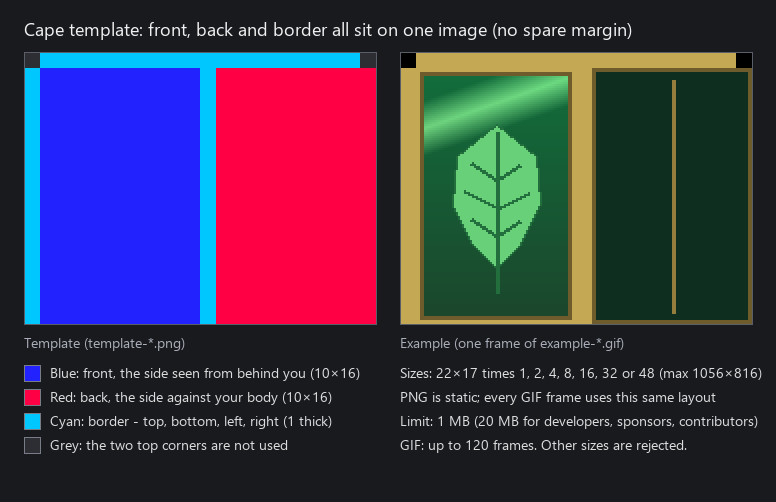
Cape template
Capes are drawn on a template. Download one, replace the blue (front), red (back) and cyan (border) areas with your design, save it as a PNG or GIF, then upload it.
Download a template (pick a size)


Bigger sizes allow finer detail but make bigger files. If unsure, use 88×68.

Draw it on the template: 22×17, 44×34, 88×68, 176×136, 352×272, 704×544, 1056×816. File size: up to 1 MB for regular players, 20 MB for developers, sponsors and contributors. Anyone can upload a PNG; GIFs (up to 120 frames) are for developers, sponsors and contributors. If you upload 3 or more capes within an hour, you have to wait 12 hours before uploading again.
Not allowed: political, obscene or sexual, unlawful, racist or hateful content; advertising (commercial promotion, promoting other servers, real-money trading such as selling LE for cash, real-life contact details; guild promotion is fine); and anything else against Wynncraft’s rules. Do not abuse uploads either (for example, uploading many capes in a short time). Capes that break the rules are removed, and the uploader may lose the ability to upload.
You can also drop the image here. If the size is right, the model above tries it on first.
Removes all your data from our server: check-in record, cape, cape history and favourites, website account and link, and feedback you sent. Ban and review records are kept; see the privacy policy.